Short answer
Trace the logo: the converter at the top of this page turns a PNG or JPG into an SVG made of vector shapes, free and in your browser. Use the Poster preset for logos with flat colours. Then convert the SVG to EPS or PDF if your printer asks for one. Converting a PNG straight to EPS does not make it a vector: it only wraps the same pixels.
Vector or pixels: what’s the difference?
A PNG or JPG is a grid of coloured dots (pixels). Enlarge it and the edges turn blurry or blocky. A vector file (SVG, EPS, PDF, AI) stores shapes: lines, curves and fills, which a printer can draw at any size, from a business card to a building banner, with perfectly sharp edges.
That is why print shops, sign makers, T-shirt printers and sticker cutters ask for a vector logo. A cutting machine also needs the outlines themselves, which only a vector has.
| You need | Is a 300 PPI PNG enough? | Best file |
|---|---|---|
| Business cards, flyers, letterheads | Usually, at the printed size | PDF or SVG, if you have it |
| Banners, signs, vehicle graphics | No: it blurs when enlarged | Vector (PDF, EPS, SVG) |
| Die-cut stickers, vinyl, laser cutting | No: the machine follows outlines | Vector (SVG, EPS, PDF) |
| Screen-printed T-shirts | Often not | Vector with flat colours |
| Websites and apps | Yes | SVG or PNG |
Which way to a vector logo?
It depends on what you start with. If someone made your logo in a design program, you may already have a vector version (ask your designer for the PDF, SVG, AI or EPS). Then only the format needs changing. If all you have is a PNG or JPG, it has to be traced.
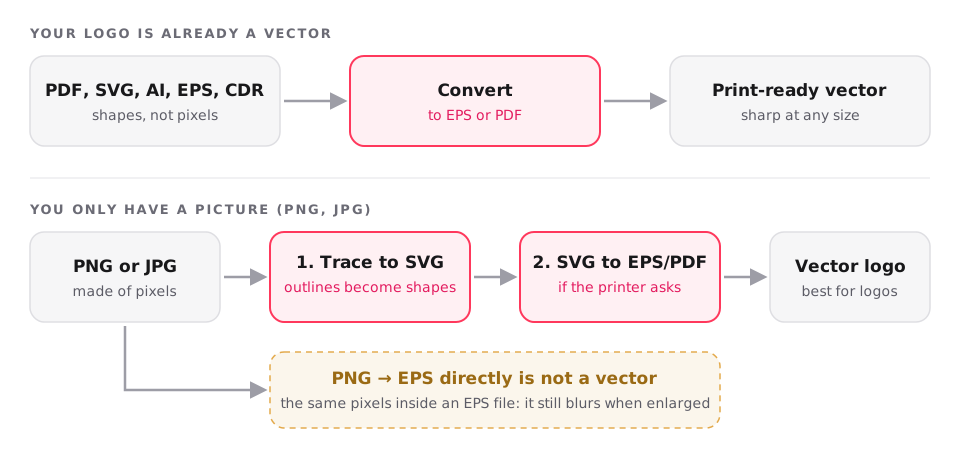
Trace a PNG or JPG logo to SVG
- Drop the logo at the top of this page (PNG, JPG, WebP, GIF or BMP). Use the largest, sharpest copy you have.
- Open Options and pick a preset: Poster for logos with a few flat colours, Black and white for one-colour logos and line art, Photo for pictures with shading.
- Click Convert and download the SVG. It is traced in your browser, so the logo isn’t uploaded.
- Open the SVG in a browser or design program and zoom right in: the edges stay sharp. If small specks appear, raise Ignore specks smaller than in Options and convert again.
Make the EPS or PDF your printer asks for
- Convert the traced SVG with SVG to EPS or SVG to PDF; the shapes stay vectors.
- Already have a vector logo? Use PDF to EPS, AI to EPS or CDR to PDF directly: nothing needs tracing.
- Send the printer the EPS or PDF, and keep the SVG: it is the easiest of the three to edit later.
Tip: These conversions run on our server with Inkscape and take about half a second for a logo; the files are deleted after 72 hours.
We tested it: three logos and a photo
We traced three logos saved as PNG and one small photo, in Chrome on a laptop, with the default settings. The three logos took 2.3 s together and came back as clean vectors of 15 to 60 shapes, smaller than the PNGs. The photo shows the limit of tracing: a 6 KB JPG became a 113 KB SVG of 368 shapes that looks like a poster of the photo, not the photo itself.
| Picture | Original | SVG | Shapes |
|---|---|---|---|
| SVG logo, 800 × 800 PNG | 44 KB | 26 KB | 15 |
| HexChat icon, 600 × 600 PNG | 49 KB | 32 KB | 18 |
| Flag of Brazil, 1000 × 700 PNG | 42 KB | 21 KB | 60 |
| Photo of a rose, 227 × 149 JPG | 6 KB | 0.1 MB | 368 |
Tip: Tested on 8 November 2026. Converting a logo SVG to EPS on our server took about 0.5 s in our weekly tests with real files.
What print shops ask for
Requirements differ between printers, so check yours. As an example, Sticker Mule’s artwork guide recommends SVG for logos and vector artwork, PDF Print for most designs, and at least 300 PPI at the final size for PNG and JPEG. It accepts RGB artwork and converts the colours to CMYK for printing, warning that colours may shift slightly.
ConvertKitty keeps your colours as they are (usually RGB) and doesn’t convert them to CMYK. If a printer insists on CMYK, ask them to convert it, or do it in a design program such as Inkscape (free) or Illustrator.
What tracing can’t do
- Photos and gradients turn into hundreds of flat patches: fine for a poster effect, not for a faithful copy.
- Text becomes shapes. It looks the same but can’t be edited as text any more; for editable text, retype it in a design program.
- Tiny or blurry logos give rough edges, because the tracer can only follow what is there. Start from the largest copy you have; a logo only 100 pixels wide won’t trace well.
- Fine details smaller than the speckle size are dropped on purpose (they are usually noise). Lower Ignore specks smaller than in Options to keep them.
How the tracer on this page works
ConvertKitty traces pictures with vtracer, the open-source tracer from visioncortex, compiled to WebAssembly and running in your browser. Pictures up to 200 MB never leave your device. SVG to EPS and PDF, and PDF, AI and CDR conversions, run on our server with Inkscape; those files are deleted after 72 hours.
Frequently asked questions
How do I convert a logo to a vector file for free?
Trace it: drop the PNG or JPG on ConvertKitty’s PNG to SVG converter, pick the Poster preset for flat-colour logos, and download the SVG. Then convert the SVG to EPS or PDF if your printer asks for one. It all runs in your browser.
Does converting PNG to EPS make it a vector?
No. A normal PNG to EPS conversion puts the same pixels inside an EPS file, so it still blurs when enlarged. For real vector shapes, trace the PNG to SVG first, then convert the SVG to EPS.
What file format should a logo be for printing?
A vector format: PDF, SVG, EPS or AI, which stay sharp at any size. Many printers also accept PNG or JPEG at 300 PPI at the printed size for small items such as business cards. Check your printer’s artwork guide.
Can I convert a JPG to vector?
Yes, by tracing it to SVG. It works best for logos, icons and drawings with clear edges and a few colours. Photos become posters of many flat patches, and the file gets much larger: in our test a 6 KB photo became a 113 KB SVG.
Which tracing preset should I use for a logo?
Poster for logos with a few flat colours, Black and white for one-colour logos, signatures and line art, and Photo for pictures with shading. If small specks appear, raise “Ignore specks smaller than” in Options.
Can I convert a PDF logo to EPS without losing quality?
Yes. If the PDF holds the logo as vectors (as most PDFs from design programs do), PDF to EPS keeps the shapes and text as vectors, so nothing is lost. Each page becomes its own EPS file.
Will my vector logo be in CMYK?
No. ConvertKitty keeps the colours as they are, usually RGB. Many printers convert RGB to CMYK themselves (Sticker Mule does, for example), though colours may shift slightly.
Is my logo uploaded when I trace it?
No. Tracing runs in your browser for pictures up to 200 MB. Only SVG to EPS or PDF runs on our server, which deletes the files after 72 hours.
Can I edit the traced SVG?
Yes. Open it in Inkscape (free), Illustrator, Affinity Designer or Figma: each shape can be recoloured, moved or deleted. Text in the logo has become shapes, so retype it if you need to change the words.
Sources
- Artwork guide: file formats, resolution and colour · Sticker Mule
- VTracer: raster to vector graphics converter · visioncortex
- Inkscape (free vector editor) · Inkscape
- Vector graphics · Wikipedia
- Encapsulated PostScript · Wikipedia
Tools for this
- PNG to SVG Converter
- JPG to SVG Converter
- SVG to EPS Converter
- SVG to PDF Converter
- PDF to EPS Converter
- AI to EPS Converter
- CDR to PDF Converter
- PNG to EPS Converter
More
Updated